
“Private” in a messaging app is not one claim, it is four, and an app is allowed to mean the cheapest one. Read which of the four a sentence is actually making before you decide what you bought.
Short version for a normal household: if you want the strongest thing available without doing anything unusual, Signal is the one whose own description names a mechanism instead of an adjective. If what you need is for the people in your contacts to move over, that is a logistics problem, not a security one, and WhatsApp making the same encryption claim is a reasonable answer.
The evidence, in their wordsSix sentences that all use the same word
These are not reviews or rumours. Each line below is copied from what the developer itself submits as the app description in the store, so the wording is chosen deliberately and checked by the store before publication. Read them as a thread and the difference stops being subtle.
Names a mechanismpoints at a property of the protocol, then states the consequence
Names a mechanismand makes the rare move of saying the company itself cannot
Names a mechanismsame category of claim as Signal’s first sentence
Adjective“private” doing work here that the previous sentence already did properly
Numbers, not a mechanismevery ingredient is a real cipher; the sentence never says between your device and theirs
Where the data liveshistory kept on someone’s servers is a different architecture from a peer-to-peer secret
Policy promisea statement about what a company will choose to do, not about what is technically possible
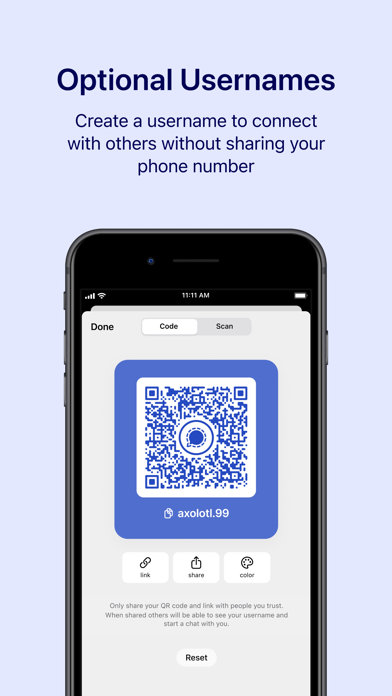
An identity tradethe opposite answer to WhatsApp’s, and a real difference rather than a better one
Names a mechanismbut in a sentence about vanishing, which is a narrower promise than the one Signal and WhatsApp make
Silenceno privacy sentence appears anywhere in its description, which is itself the answer
A fifth meaning“private” here means nobody knows your real number, not that anyone cannot read it
Six vendors, and the word is doing different work in each sentence: a property of a protocol, a bare adjective, a list of cryptographic ingredients, a promise about company behaviour, an identity trade, a silence, and a synonym for “unpublished”. A reader who treats those as one claim will choose an app on the strength of a word that meant something else.
The four questionsWhat “private” is allowed to mean
Can anyone but you and the recipient read the message?
This is the one people think of. The only version worth trusting is end-to-end encryption: the key lives on your devices, not with the company. An app can be fully “encrypted” — readable on its own servers — and still fail this question completely.
Who can see who you talk to, and when?
Even when message contents are sealed, somebody usually knows that you messaged this person, at this time, from this place, in a group of this size. That layer is metadata and it is rarely covered by the word private at all. Not verifiable from a listing
What do you have to hand over to get an account?
A phone number is a permanent public handle: it links your contacts, your carrier’s logs and your account together. Requiring one is not the same as being unsafe, but it is the opposite of anonymous, and it is decided for you at signup.
Where does your message history live?
On this device only, on all your devices through the company’s servers, or in a cloud backup. The last one matters most and is the least discussed: an end-to-end encrypted chat that is copied into a backup whose key the company holds is a different security situation than the chat itself.
What each one leads withThe same shelf, three different promises


Put those three next to each other and the ranking problem resolves itself. Two of them are not competing to be private at all. One is telling you it is easy. The useful question was never “which app is private” but “which app is private about the thing you are actually worried about”.
The part nobody advertisesBackups, and the one place a company says it out loud

Apple, which sells both an encrypted cloud and an encrypted messaging app, is the most useful source here precisely because it has no reason to oversell the difference. Its own wording on iCloud:
Apple support, iCloud data security overview.
Read that sentence twice. “Encrypted” and “end-to-end encrypted” appear in the same line, and the second one applies to only some data. Everything else in the discussion follows from that distinction, because a key held by a company so that it can help you recover your data is also a key that company can be made to use.
Same document.
Same document.
Set those two lines side by side and you have the hole most people fall into: the conversation is end-to-end encrypted, and the copy of it that lands in your cloud backup may be protected by a key the company holds so you can restore your photos after buying a new phone. Apple documents a switch for this and is candid about what it costs you — the recovery help disappears when the key stops being theirs. This is the settings screen worth ten minutes
Same document.
That last one is not a criticism of Apple; it is a fact about email that every messaging app eventually runs into. The moment your private chat can send a link, a code or a receipt to somebody’s inbox, it has left the encrypted room and entered a system designed since its first day to be readable by whoever operates the next server.
Reading the shelfEach app, by what its own text commits to
| App | What its listing says about privacy | What that does and does not answer |
|---|---|---|
| Signal | End-to-end encryption named as the reason content is private, plus an open protocol and the sentence about the company not being able to read messages. Also: “No back doors, no data collection, no compromises.” | Answers question 01 with a mechanism. The no-data-collection line is a policy claim, and 02 cannot be settled from a listing either way. |
| End-to-end encryption stated for messages and calls, and repeated inside the chat in its own screenshots. Also: “All you need is your phone number – no usernames or logins needed.” | Answers 01. That second sentence is not a convenience note, it is the answer to 03: the phone number is the account. | |
| Telegram | Cipher names and key exchange, a promise never to give third parties data, and chat history “securely stored in the Telegram cloud for as long as you need it.” | Answers 04 in favour of the company’s servers, and 02 with a promise. It does not say which conversations are end-to-end encrypted by default; that is a settings question, not a listing question. |
| Messenger | End-to-end encryption mentioned alongside disappearing chats, and reaching people “no phone number needed.” | Answers 03 the other way from WhatsApp: a social handle instead of a number, which is a different trade, not a better one automatically. |
| Discord | Nothing. Gaming, communities, streaming, emoji. | Honest reading: this is hosted group chat. Answer 01 by assuming the server can see what a server can see, and check separately. |
| TextNow | “Private” in the sense of a second line nobody knows about, sold alongside data plans. | Answers a different question entirely: hiding a number, not hiding content. Also relevant that a free line can be reassigned. |
Choose by threat, not by brandWho exactly are you being private from?
- From the person standing next to you
- Screen lock, a lockable notification preview setting and a short disappearing-message timer beat any app choice. Encryption does nothing about a shoulder.
- From the app company
- This is where end-to-end encryption actually helps, and where the difference between the six listings above is real. Read for the phrase and for whether it applies by default.
- From your phone carrier
- Calls and messages that travel as data rather than as SMS are a different thing to intercept, which is why one of the descriptions above bothers to say it avoids SMS fees. Group size and timing remain visible.
- From an employer who issued the number or the phone
- A messaging app cannot protect you from a device that belongs to somebody else. This is the situation where the app you install is the least important variable.
- From someone you have already given access
- Linked devices, restored backups and shared accounts. Nothing in the encryption model survives this, and it is by far the most common way a “private” chat stops being private.
- From a company that wants your attention
- Not answered by any of the six listings above, and not answered by the word private at all.
Five minutes of settingsWhat to check on the app you already use
- Open one ordinary conversation and look for the encryption notice inside it, not on the store page. If the app cannot show you that in-chat statement, it is probably not making the claim you think it is.
- Find what your account is identified by: a phone number, a username, or an address only your contacts hold. Decide whether that is what you want a former colleague to keep.
- Check whether message history is kept in a cloud backup, and whether you have ever looked at what protects that backup. If you use an iPhone, the setting exists and the trade is documented: recovery keys move from the company to you, and the company’s recovery help goes away with them.
- Look at every device listed as connected. A tablet you abandoned in a drawer is a working copy of every conversation since the day you paired it.
- Decide, group by group, whether a stranger can find the room. Public group chat is not a privacy failure; it is a room with the door off. The failure is assuming it has a door.
We quoted these apps because their own store text is public and stable. What a listing cannot tell you is anything about question 02: who keeps records of who messaged whom and when. Every serious answer to that lives in the vendor’s help centre or privacy documentation, not in a store description — and none of those pages were reachable from the network used to write this article, so we have made no claim in that direction. Two more things we did not do: we installed nothing for this piece, and we did not test whether any advertised behaviour actually happens on a phone.
- Every quoted app sentence — the app description that each developer submits to the store, retrieved from the store’s public catalogue interface for Signal, Telegram, WhatsApp, Messenger, Discord and TextNow, and checked character by character against this page after normalising dashes and quotation marks. No paraphrase is presented as a quotation.
- Every quoted iCloud sentence — retrieved directly from Apple’s support documentation on iCloud data security, and quoted with the same check. That document is where the “encrypted” versus “end-to-end encrypted” distinction is stated by a party with something to lose either way.
- Store images — five pictures supplied by the developers themselves and served by the store. Each caption says what is visible in the frame rather than treating it as proof of behaviour, and the sample names, messages and member counts inside them belong to the vendors’ marketing, not to real people we know.
- Not obtained — help-centre or privacy-policy text from any of the six vendors. Signal, WhatsApp, Telegram, Discord, Meta, Viber, TextNow and Google support domains were all unreachable from this network, so statements about metadata retention are marked as unverified rather than filled in from memory.
- Our own reasoning — the four-question frame, the ranking of claim types, and the settings checklist. Those are how we would read this, not documents anyone published.
Our pages for the apps above sit on the communication and workplace hub, next to Messenger, Telegram and Discord. If any of them states something about encryption that its own listing does not, tell us and we will correct the page.
Written by the Dlzer editorial desk. Not affiliated with, endorsed by or sponsored by Signal, WhatsApp, Telegram, Meta, Discord, TextNow or Apple. Names and descriptions belong to their owners and are quoted here to identify the products; a quoted claim is reported as that vendor’s statement, not adopted as ours.