
Two tools, four names, and one that does the opposite. Picsart’s own listing calls its removal features Background Remover and BG remover, Object Remover and Object Eraser, then describes a third thing — Smart Background — that does not remove so much as replace. If you have ever searched for a tutorial under one name and found a button labelled another, this is why.
Everything quoted below is from the description Picsart supplies for its own listing, so the naming is the developer’s, not a reviewer’s guess.
The three jobsTake the person out, take the background out, swap the background
Picsart, opening line of its own listing.
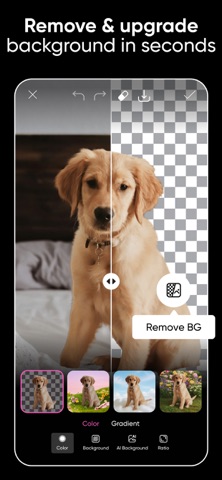
That first sentence is followed by a run-through of verbs, and the two removal verbs are the useful ones: “remove backgrounds with Background Remover (BG remover), erase objects with Object Remover (Object Eraser)”. Read the tool cards below as three different intentions.
Background Remover also: BG remover
Takes the whole scene behind the subject out. This is the one for a cutout, a product shot, or a white-background ID-style photo.
“Remove background for clean cutouts and product shots.”
Object Remover also: Object Eraser
Takes one thing out and leaves the rest of the photograph alone. The stranger’s shoulder, the bin, the cable across the sky.
“Object Remover / Object Eraser deletes unwanted objects.”
Smart Background not a remover
Put something new behind the subject. It belongs in this article only because people reach for it when the first two have already done their work.
“Smart Background blends seamless backdrops” — the listing continues by calling it a fast background changer for ads and promos.
There is a fourth that is easy to confuse with the second, and it is worth naming here: “AI Replace transforms images with face swaps, hair color changes, and selfie edits.” Replacing is not erasing. On a phone menu with similar icons, the difference is the difference between a clean photo and a person’s face on someone else’s body.
What “free” is doingTwo sentences further down the same listing
Picsart’s upgrade block.
Immediately after it, same block.
The download and the editor itself: “free and easy to use” is the phrase in the first paragraph, and every tool above is described there without a price word attached.
Described in quantities rather than names: “premium content”, “extra retouch features”, “more AI tools”, “more storage space”.
Here is the honest limit of that table: the listing never maps a named tool to a named tier. It says the paid plans carry more of the things that make the app interesting, and it leaves you to discover per-button which is which. That is not evasion unique to Picsart — it is the shape of almost every freemium app description — but it does mean the sentence to read before you tap “start free trial” is the store’s own subscription summary, not this paragraph or that one.
| The line | What it settles |
|---|---|
| “free and easy to use” | What you can open without paying, as a claim about the download |
| “premium content, templates, and extra retouch features” | What one paid tier is described as adding |
| “Availability may vary.” | That any specific feature named in the listing may not be in front of you today |
Under the buttonsThe listing says several other models are in there
The clearest sign that a feature can change without the app updating is this pair of sentences: “Aura combines AI models to create and edit AI images and videos.” and “Availability may vary. Trademarks belong to their owners.” The paragraph around them names other companies’ models by name.
Practically, that means “the AI tool” is not one engine with one behaviour. It means the same prompt can behave differently a season later, and it means a tool you watched work in a tutorial may be labelled the same and powered by something else. All our reading — the two quoted sentences are the evidence for it, not the wording.
Two lines in the listing describe the same material from both sides: “Upload selfies to generate customized AI avatar in different styles.” and “AI Replace transforms images with face swaps, hair color changes, and selfie edits.” Uploading a face is a decision with a copy of it attached, and a face swap is a decision about somebody else’s. Neither sentence in the listing says what happens to the uploads afterwards; the store description is not where you would expect that to be settled, and we did not find their answer for this article.
The listing does carry two signposts at the very end, labelled “Terms and conditions” and “About Ads”. The second is a link into a privacy policy at an anchor about interest-based advertising, which is the store’s own way of telling you there is an advertising side to a “free” app. That is worth one click before you decide what the real price is.
Picsart’s help centre was not reachable from the network used to write this, so this page names no menu path, no screen order, and no current price. It also does not say which of the tools above is behind which paywall on your account, because the listing does not say either. The subscription summary on the store page, and the in-app plan comparison, are the authorities for that.
- All quoted sentences — the app description Picsart supplies for its own store listing, retrieved through the store’s public catalogue interface and matched word for word with this page.
- One store image — supplied by the developer; the caption records what the screen says and, equally, what it does not.
- Our own reading — the three-intention split, the free-versus-tier table, and the caution about faces. Not vendor guidance.
Picsart’s page here is this one, on the entertainment, media and news hub. Related: what Snapseed’s “no strings attached” actually covers, and is OCR free, or does extracting text cost extra.
Written by the Dlzer editorial desk. Not affiliated with, endorsed by or sponsored by Picsart. Picsart and its tool names are the company’s marks, used to identify the product; quoted lines are Picsart’s own description of what it does.