
The word “offline” appears twice in this listing, in two different sections. Once among the free features, where it means essential text translations with no connection. Once in the paid list, where it says something larger: full offline translation mode. A traveller reading only the first sentence will plan a trip around it.
All quoted lines come from the description APPJIGGLY LIMITED supplies for Voicelator.
The two sentencesSame word, different reach
Free feature bullets.
The premium list, several sections later. The paid side also names “Unlimited voice, text, and camera translations” and a “100% Ad-free translation experience”.
Between those two lines sits every practical question a traveller has. “Essential text” is not defined; the word “full” on the paid side implies the free side is partial, without saying which parts. The likely reading — typed text works without a signal, speech and camera probably do not — is an inference, and it is exactly the kind of assumption that fails at a station ticket window.
Advertised without a price word
- “Offline Mode: Access essential text translations anytime, anywhere — no internet connection required.”
- “Automatic Language Detection: Just speak or type; Voicelator identifies the source language automatically.”
- “Phrasebook & Favorites: Save essential expressions and frequently used translations for quick access.”
Advertised inside the premium block
- “Unlimited voice, text, and camera translations”
- “100% Ad-free translation experience”
- “Full offline translation mode”
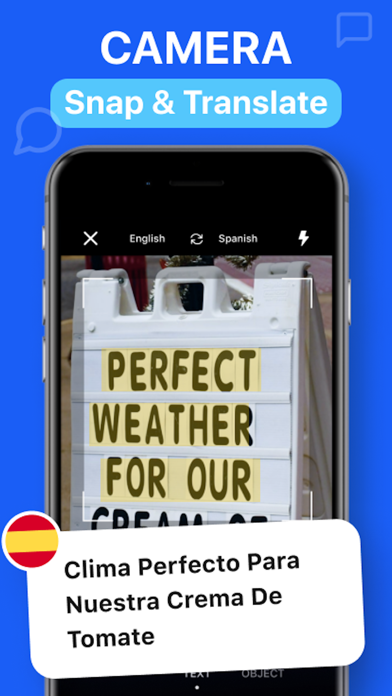
The camera featuresTwo different jobs, easy to confuse
“Camera & Photo Translation: Point your camera at signboards, menus, or documents, or import photos from your library for instant text recognition.” is reading words that are already there. “Object Recognition: Point your camera at any object to learn its name and translation in real time.” is naming a thing you are looking at. The first is a translator; the second is closer to a vocabulary tool, and the difference matters when you are trying to ask about something that has no sign on it.
The keyboard claim is the one that deserves a pause: “Keyboard Translator: Translate messages directly inside your favorite chat apps like WhatsApp, Telegram, and Twitter without switching screens.” It is a genuinely clever convenience — the translation happens while you type in somebody else’s app. It is also a keyboard, which means it sits in the path of everything you type in every app, and the description says nothing about what happens to that text. That is not an accusation; it is the most obvious question a keyboard extension should answer, and this listing does not.
“Subscription prices correspond to the matrix segment set in Apple’s App Store for various currencies.” Translated: the developer does not set your local number, the store’s price tiers do. If a price looks wrong for your region, that sentence explains where it came from — and why the figure in a review video may not be the one on your phone.
The billing lines are standard, which is why they are easy to skip: “Your free trial subscription will automatically renew to a paid subscription unless auto-renew is turned off at least 24 hours before the end of the trial period.” and “You can manage or cancel your subscription anytime in your iTunes Account Settings.” The coverage claim — “100+ Languages Supported: Translate text and voice accurately to communicate freely anywhere in the world.” — comes with the word “accurately” attached, which for a language tool is the claim most worth testing on a phrase you actually know.
| Do this at home, on purpose | Because the listing does not say |
|---|---|
| Turn on airplane mode and try a phrase you know | Which languages the “essential” offline set includes |
| Try a spoken sentence with no signal | Whether voice works offline at all, or only “text” does |
| Try the camera on a menu photo | Whether camera recognition is one of the unlimited paid features by design |
| Decide separately about the keyboard | What the extension does with everything you type in other apps |
Four jobsWhich control to reach for, and when
“Speak, type, and translate instantly with Voicelator – your ultimate AI-powered translation assistant.” is three verbs in a row, and they are genuinely three different products bolted together. Untangling them is the quickest way to know whether this kind of app will help you at a specific moment:
| Situation | Control the listing describes | What it is good at |
|---|---|---|
| Typing to a person in another language | “Keyboard Translator: Translate messages directly inside your favorite chat apps like WhatsApp, Telegram, and Twitter without switching screens.” | Keeping the conversation in one place; short messages; tone that has to look like you wrote it |
| A printed menu or a street sign | “Camera & Photo Translation: Point your camera at signboards, menus, or documents, or import photos from your library for instant text recognition.” | Blocks of text; and the import half matters more than the live camera in bad light |
| You do not know the word for the thing | “Object Recognition: Point your camera at any object to learn its name and translation in real time.” | Vocabulary, not sentences; useful at a market stall, useless for a contract |
| You need to hear it | “Voice & Speech Controls: Enjoy high-quality voice playback with adjustable speeds and natural male or female voices.” | Rehearsing pronunciation and training your ear before you arrive |
The slow-playback detail is the underrated one. A phrase spoken at half speed is a different learning object than the same phrase at native pace, and it is the feature that makes a translator useful before a trip rather than only during it. The same logic applies to “Apple Watch Integration: Translate on the go right from your wrist” — honest to list, but a wrist is where you check a phrase you already typed, not where you compose one.
The long language listWhere this listing is more careful than most
Most app descriptions say “supports 100+ languages” and leave it there. This one then prints the list, and the list contains distinctions that usually get flattened: Chinese broken into Cantonese, Mandarin and Taiwan forms; Arabic into Egypt, Saudi Arabia and UAE; Portuguese split between Brazil and Portugal; Spanish between Mexico, Spain and the US; English between Australia, UK and US.
That is a real mark of care, and it is also the honest way to describe what machine translation actually is: not one language with variants, but a set of separate systems with different amounts of training behind each. The practical consequence is that the phrase which works perfectly in one form may come out strange in another, and a listing that admits the difference is a listing you can trust slightly more when it is vague about something else — such as what “essential” means in its offline sentence.
Before you tap start trialThe three billing sentences, read in order
The description carries the usual set, and one of them has a consequence people only notice on a statement:
- “To avoid being charged, ensure cancellation is completed at least 24 hours before the current period or trial ends.” — the buffer exists because a same-day decision can fail to register.
- “Any unused portion of a free trial period, if offered, will be forfeited when purchasing a premium subscription.” — plainly: if you are mid-trial on one plan and buy a different one, the remaining trial days are not credited or carried over. They disappear.
- “You can manage or cancel your subscription anytime in your iTunes Account Settings.” — the exit is on the store side, which is why the app’s own screens can be a dead end when you are looking for it.
The second of those is the one worth keeping in mind if you are comparing a monthly and an annual plan, or a single app against a bundle: switching mid-trial converts nothing.
A forty-minute rehearsalRun it at home, where failure costs nothing
Everything above is a description of intentions. The test takes less than an hour and tells you more:
- Write down three sentences you will actually need — not tourist phrasebook lines; the ones for your specific trip, family or job. Machine translation is excellent on the generic and poor on the specific, and your specific is what you will need at the moment it matters.
- Translate all three, then translate them back into your own language and read the back-translation carefully. Anything that comes back changed is a sentence you should not trust in a conversation.
- Switch the device off the network and repeat — the whole point of this article. Note exactly which of the four controls above still work; that is your offline inventory, and no listing can produce it for you.
- Photograph a real printed page in bad light — a dim restaurant menu or a shiny sign. Camera translation in good conditions is a demo; in bad conditions it is the thing you will actually do.
- Type one message in your usual chat app through the keyboard, then go and decide separately whether you are comfortable with a third-party keyboard sitting in that path. That is a household judgement, not a technical one, and it is worth making before you are in a hurry.
“Designed for seamless communication on the go, Voicelator bridges language barriers whether you are browsing the web, chatting in messengers, traveling, or practicing a new language.” Four use cases in one line, and the fourth — practising a language — is the one a translation app should not be hired for. A tool that gives you the correct sentence never tells you why that sentence is correct, which is the only thing that makes a phrase stick. Use it at the counter; do not use it instead of a course.
The developer’s support site was not reachable from the network used to write this, so no menu name, download size or language list is claimed here, and nothing about data handling is asserted in either direction — the listing is silent on it, and this page does not fill that silence. If the offline question matters for an actual trip, the ninety-second airplane-mode test above is better evidence than any description.
- All quoted sentences — the app description supplied by APPJIGGLY LIMITED for the Voicelator listing, retrieved through the store’s public catalogue interface and compared word for word with this page.
- One store image — supplied by the developer; the caption transcribes the headline and button labels on it.
- Our own reading — the free-versus-paid clash, the keyboard caution and the pre-trip checklist. Not vendor guidance.
Voicelator’s page here is this one, on the tools and devices hub. Related: what “offline” actually means across three apps, and is OCR free, or does extracting text cost extra.
Written by the Dlzer editorial desk. Not affiliated with, endorsed by or sponsored by the developer. Voicelator is its owner’s mark, used to identify the product; quoted lines are the developer’s own description of what it does.