
The school app sends you photos of your child. Here is what you can ask for.
Start with the vendor’s own words, because they are more direct than any review. ClassDojo, in the description it submits to the app store, lists what the app is for:
ClassDojo, app description supplied by ClassDojo, Inc.
Read that as a design statement. The camera is not a corner feature that got bolted on; sending images of children to adults who are not in the room is one of the four things the listing leads with. That is genuinely lovely when it is your child, and it is a completely different situation from most of the photo-sharing you have thought about, because the person holding the camera is not the person who decides where the picture goes.

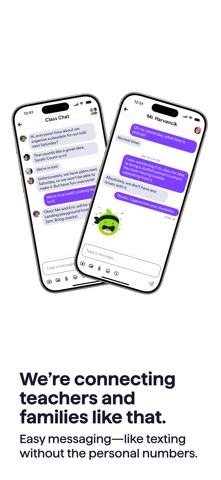
The vendor has a fourth screenshot, and I am going to describe it rather than paste it here: it shows the class feed with a posted group photograph of roughly twenty children and an adult, faces clearly recognisable, under a caption about a visit from a firefighter, with a small comment count and a view counter beneath. That is the app doing exactly what it advertises. I am not going to reproduce a classroom full of other people’s children on a website in order to argue that parents should be careful about whose photographs circulate — the argument would defeat itself.
Unpack the requestIt is really three questions wearing one coat
When a school asks permission to use an app, families usually hear one yes-or-no question. There are three, and they have separate answers.
Write them down separately, because you will ask for them separately
One. May my child be photographed at all? A classroom decision, made by an adult you trust professionally, usually with no record of you answering.
Two. Who may see the photograph? Only our families? The whole grade? Anyone with a link? Is there a public version of this feed anywhere?
Three. For how long, and who can remove it? The one that sounds obvious and is almost never answered in front of parents.
The first two are negotiable in ordinary language, and most schools have a mechanism. The third is where I have to be honest about the limits of this note: the answer lives in each app’s privacy policy and in the school’s own retention schedule, and I could not open the relevant vendor documents from the network used to write this. ClassDojo’s own listing prints the address of its policy — “Privacy policy: https://www.classdojo.com/privacy” — and that address did not load here, twice, along with its safety and parent pages. The childcare app on our hub is in the same position: no reachable policy page from here.
Whether your child’s photo is deleted at the end of the year, at the end of the account’s life, or never. Whether the vendor or the school is the controller of that data. Whether a photo downloaded by thirty families is thirty copies. Ask those three in your school’s building, in writing, and treat any answer that begins “the app handles it” as no answer at all.
A useful contrastWhat a vendor sounds like when it is specific
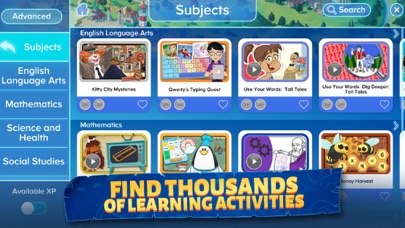
Adventure Academy is not a school-communication app; it is a games-based learning program. But it is worth holding next to the one above, because its description commits to something concrete about who can reach your child:
Adventure Academy, app description supplied by Age of Learning, Inc.
Three switches, named. That is what a specific promise sounds like in a store listing. The same company also writes that it is “Trusted by teachers and designed by early learning education experts, Adventure Academy provides a safe learning environment for students.” — which shows the other half of the trap: the word “safe” is a conclusion, and “filtered chat” is a mechanism. Read listings for mechanisms.
The part that is actually yoursWhere the photo ends up on your side
Even in a school app that behaves perfectly, one thing is quietly true: the moment a photo arrives on your phone and you save it, it stops being the school’s copy and becomes yours, inside a system you configured years ago without thinking about children.
Apple support, iCloud data security overview.
Same document, describing what changes when you turn on its higher protection setting.
Those two sentences are about your account, not the school’s, and they are the practical end of this note. A saved photo of your child’s class is now in your library, your library is in your backup, and your backup’s protection level is a setting on your phone that almost nobody has ever looked at. It is not the school’s job to fix that and it is not a reason to refuse the app — it is one free thing you can do yourself.
Before you signFour lines worth writing on the form itself
Most schools circulate a permission slip with a box to tick. A tick is not a record of what you agreed to, and by the time anything goes wrong nobody can reconstruct the conversation. You are allowed to write on the paper. Four short sentences, in the margin, do more than an argument in a staff car park.
Copy these onto the form, then photograph your own signed copy
1. Who. “Consent for my child to be photographed for this app only, not for newsletters, posters, social media or prospectuses.” The general permission and the app permission are usually separate and get bundled together.
2. Where. “Consent for the image to be visible to families in this class, and not beyond it.” If the school does not know the answer, that is useful to know before the first post, not after.
3. When it ends. “Consent ends when my child leaves the class, and I ask to be told what is deleted and when.” You are not going to win this clause; you are creating a written moment that makes the question normal.
4. The practical bit. “Please confirm the app is signed in with an account the school controls, and tell me who to contact to remove an image.” Someone needs a name. Ask for it now, while everyone is being pleasant.
That last line is the one people skip and later regret, because “email the school office” becomes a three-week argument in December when a photograph is attached to something you did not expect. A named person is the whole control.
Seven requestsWhat is reasonable to ask for, out loud
- Ask which app, and who picked it“Which app will my child’s photo be posted in, and who decided?” Not a challenge. Half the arguments later are about a decision nobody remembers making.
- Ask for the face-free optionMost teachers will happily photograph the project, the board, the hands, the garden. If you want your child out of the frame, that is a normal request and it can usually be honoured without a fight.
- Ask who else can see itFamilies in this class only, or a wider group, or anywhere a link goes. Ask specifically whether posts can appear outside the class list, and whether parents can share.
- Ask for your own copy, and the deletion answer“When the year ends, what happens to the photos?” If the answer is that nobody knows, that is the answer, and it belongs in an email rather than in a corridor.
- Ask what happens when we leaveThe school’s own retention rule matters more than the app’s marketing. Ask what the school does when a family withdraws, and ask them to name who deletes what.
- Ask for the older-child version of thisWhatever you agree now is the template for the next six years, and the photos get better and more public as children get older. Decide your line early enough that you are not deciding it under pressure at fourteen.
- Fix your side of the pipeLook at what protects your own photo backup, and decide whether you want the copy that leaves the school to sit in a cloud you control less tightly than you think.
Five minutes at the kitchen tableDo these before you decide anything
- Open the app you were sent and find one older post. Look at who can see it: if there is no visible audience label, that is worth asking about, not assuming.
- Find the account it is tied to. A school app signed in with an address your child will lose in three years is a box you will not be able to open later.
- Check your phone’s photo settings for what happens to saved images from this app: album, cloud library, shared library with a partner, another family member’s device.
- Ask the teacher, once, in writing, the three questions in the green box above. Save the reply. This is the single highest-value action in this note and it costs a paragraph.
- Decide what you will not do at all, so that the small decisions later are quick ones.
ReceiptsWhat was quoted, and what was not
- Every quoted app sentence comes from the description each company submits for its own app listing, retrieved from the store’s public catalogue interface for ClassDojo (listed by ClassDojo, Inc., rated for ages four and up, free) and for Adventure Academy (listed by Age of Learning, Inc.). Each quotation was checked word for word against that retrieved text after normalising dashes and quotation marks; the asterisk bullet markers in the original are omitted.
- The iCloud sentences were retrieved directly from Apple’s published documentation on iCloud data security and checked the same way. They describe your account, not any school app.
- Store images — three, all supplied by the developers and served by the store, each captioned with what is actually visible in the frame. Two are screen mock-ups of the vendor’s own product; the third is labelled in its caption as stylised artwork rather than a screen capture.
- Deliberately not reproduced — a fourth vendor image that shows an identifiable group photograph of about twenty children. It is described in the text instead. Republishing other people’s children would undercut the thing this note is asking readers to think about.
- Not reachable, therefore not claimed — the privacy, safety and parent pages of the app vendors discussed here, including the policy address printed inside the listing itself, and the policy page of the childcare app linked from our hub. Retention and deletion are left as questions to ask, not answered from memory.
- Our own judgement — the three-question split, the seven requests and the five-minute list. Nothing here is legal advice, and nothing was tested on a real school account.
ClassDojo and the other classroom apps we list sit on our learning and education hub; the ClassDojo page is the one referenced above. If we have mis-stated anything in a listing, tell us and we will correct it.
Written by the Dlzer editorial desk. Not affiliated with, endorsed by or sponsored by ClassDojo, Age of Learning or Apple. Product names are used to identify the products and belong to their owners; a quoted claim is reported as that company’s statement about itself, not adopted as ours.