
Signal path · what an app is actually plugged into
Cable companion apps: what stops working when you cancel the TV package
“It’s just an app” is the wrong mental model. Some of these apps are a window onto a subscription, some are a key onto an entitlement, and some only need a piece of plastic on your shelf. When the package ends, each one fails differently — or does not fail at all.
Diagram: Dlzer. Illustrative model, not a screenshot of any provider system.
CH 01Three dependencies, three different fates
The useful question is never “is this app tied to cable?” It is which layer the app checks when you tap play. Read the listings and the answer is usually stated in the developer’s own words.
Spectrum TV, listing description published by Charter Communications Operating, LLC on its App Store page.
That is a hard dependency, stated plainly: no subscription, no sign-in. Compare it with the two other shapes.
Roku Remote (Official), listing description published by ROKU INC.
Pluto TV, listing description published by Pluto, Inc. Tubi’s own text goes further: “It’s live, always on, forever fee-free and has way fewer ads than cable.”
So the three categories are: subscription apps, which need an active package; hardware companions, which need a device on the same network and could not care less about your billing; and independent apps, funded by a fee or by advertising, which keep running because nothing was ever borrowed.
CH 02What the apps in our index depend on
| App | What it checks at sign-in | If the TV package ends | Note |
|---|---|---|---|
| Spectrum TV | active TV subscription + operator login | Breaks | The listing says the subscription is required to sign in. Live line-up, on-demand and DVR access all ride on it. |
| My Spectrum | the account, not the TV tier | Depends | An account app: bills, outage status, router. If any relationship with the provider survives, this usually does; if the account closes entirely, it does not. |
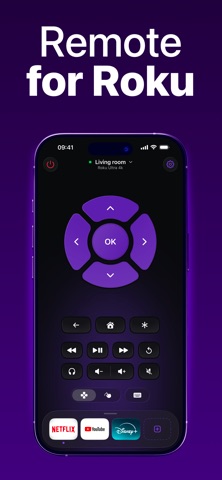
| Roku Remote (Official) | same Wi-Fi as the player or TV | Keeps working | Depends on hardware, not on a video subscription. What breaks is the channels inside the box. |
| Plex | your own media server | Keeps working | You supply the files. Nothing to de-provision. |
| Pluto TV | nothing (ad-supported) | Keeps working | Linear channels that look like cable and are funded by ad breaks. |
| Tubi | nothing (ad-supported) | Keeps working | Same model, different catalogue. |
| Fubo | its own subscription | Replaces it | A live bundle you buy instead of cable, with cloud DVR included per its listing. |
| Hulu / Paramount+ / Peacock | their own subscription | Replaces part | Paramount+ advertises “stream your local CBS station live”; Peacock the same for NBC. The broadcast network, through a different pipe. |


CH 03The order you will notice it in
Cancellation is not one door shutting. It is a sequence, and the sequence is what surprises people.
Stops, usually immediately
- Live channels streamed through the operator’s own app.
- The on-demand library that came with the package.
- In-home streaming and any “watch from anywhere” feature.
- Access to the channel apps that authenticate with a TV login rather than with their own subscription.
Keeps going
- Paid streamers you subscribe to directly, on their own account.
- Free ad-supported services (Pluto, Tubi and the rest of that group).
- Plex and anything served from your own library.
- The remote app for your streaming box — plus whatever is on that box that you pay for separately.
- Terrestrial channels, if you add an antenna.
The item people lose is not the app, it is what they had recorded. Spectrum’s own listing describes recording as a feature of the service — “record your favorite TV shows and movies (with optional DVR services)” — and playback of those recordings on “compatible DVRs”. That is the shape of the problem: the recording lives on the operator’s equipment, not in your phone, and there is no export button waiting for you. Not verified How quickly access ends, and whether anything survives a downgrade or a transfer to a streaming-only tier, is operator-specific and we have not tested it. Plan for the recordings ending with the package, and finish watching them before the last day.
CH 04The grace period nobody can promise you
The question I get asked is: “my login still works tomorrow, so am I fine?” Sometimes yes, for a while. A TV-provider login is an assertion the operator makes about your account; apps re-check it on their own schedule, some every launch, some only when a token expires. So a working sign-in the morning after cancellation tells you about token timing, not about your rights.
Not verified here We cannot test de-provisioning timing without your account and your operator, and the answer varies by provider, by app and by tier. What you can do in two minutes: find out which of your apps authenticate with a TV login at all. If an app has its own username and password that you pay for separately, it is not a companion app and cancellation does not touch it. If the sign-in screen offers “watch with your TV provider”, it is borrowed access, and the lender is leaving.
CH 05Before the last day
- Open every app you actually use and note which one signs in with a TV provider. That list is your real exposure.
- Finish watching what you recorded. Assume it cannot be moved.
- If you want the same channels afterwards, decide the replacement explicitly: a live bundle such as Fubo, Hulu with live TV, or YouTube TV; or an antenna for the local broadcast networks, whose streamer apps often carry the same station on a paid plan.
- Check what your streaming box is doing. A Roku or Fire TV keeps working; the channels inside it may not.
- Keep the account app until the final bill and any return pickup are settled — it is usually the only place the paper trail lives.
- Cancel the subscriptions you forgot inside the cable bundle. They are frequently billed separately once the package goes away, and nothing will tell you.
- Re-check your app list a week later. The failures that arrive on a token expiry are the ones people describe as a surprise.
CH 06One hazard worth naming
Search the store for a remote app for a popular streaming box and the results are a field of look-alikes: an official app from the hardware maker, then several remote apps from unrelated sellers with names built from the same words. The listing text is the only reliable discriminator, and the developer name shown under the title is the line to read. This is not a cable-cancellation problem — it is a reason to be suspicious of any app whose name is a generic noun, including ones we have pages for.
- Listing descriptions published by the respective developers on their App Store pages: Charter Communications Operating, LLC (Spectrum TV; My Spectrum), ROKU INC (Roku Remote Official), Pluto, Inc. (Pluto TV), Tubi, Inc (Tubi), fuboTV Inc. (Fubo), Hulu, LLC (Hulu), CBS Mobile (Paramount+), Peacock TV LLC (Peacock), Google LLC (YouTube TV), Plex Inc. (Plex).
- Version numbers and bundle identifiers were read from Apple’s public catalogue interface for the US store.
- Nothing in this article comes from a provider’s help centre; those pages were not used.
CH 07What this article is not
It is not a statement about your specific provider’s behaviour after cancellation. Dlzer has no test accounts with any cable operator, no device lab, and no way to observe how quickly a given app re-checks an entitlement. The claims here are of two kinds, and they are labelled as such: what a developer says about its own app, quoted from the listing; and what follows structurally from which layer an app depends on. Where a question cannot be answered without your account — the grace period, the fate of recordings, tier transfers — the article says so and tells you how to check on your own setup instead. Corrections are welcome at [email protected], naming the app and the sentence; how we handle them is on our transparency page.
Written by the Dlzer editorial desk. Not affiliated with, endorsed by or sponsored by Charter, Spectrum, Comcast, Xfinity, Roku, Plex, Pluto, Tubi, fubo, Hulu, Paramount, Peacock or YouTube; names, marks and listing screenshots belong to their owners and appear to identify the products discussed.